
To take an express bus in Korea, confirm your departure terminal, buy or collect your ticket, find the correct boarding gate and sit in your assigned seat. This photo guide shows how the signs, machines and ticket details fit together at Central City in Seoul.
The Jeonju ticket below is an example for learning how to read a ticket. Use the destination, departure time, gate and seat shown on your own booking.
On this page — tap to expand
- 1. Check the terminal name before travelling
- 2. Buy a ticket or collect an existing booking
- 3. Use the English ticket machine screen
- 4. Read your ticket: gate number and seat number are different
- 5. Match the ticket to the boarding gate display
- 6. Board, store your luggage and find your seat
- 7. Use the restroom before departure and check rest-stop instructions
- Before boarding: a quick checklist
1. Check the terminal name before travelling
Start with the exact departure point on your booking. “Seoul” alone is not enough: Seoul Express Bus Terminal and Central City are neighbouring terminals served by Express Bus Terminal Station on subway Lines 3, 7 and 9. Follow the signs for the terminal on your ticket. Dong Seoul and Seoul Nambu are separate departure points elsewhere in the city.
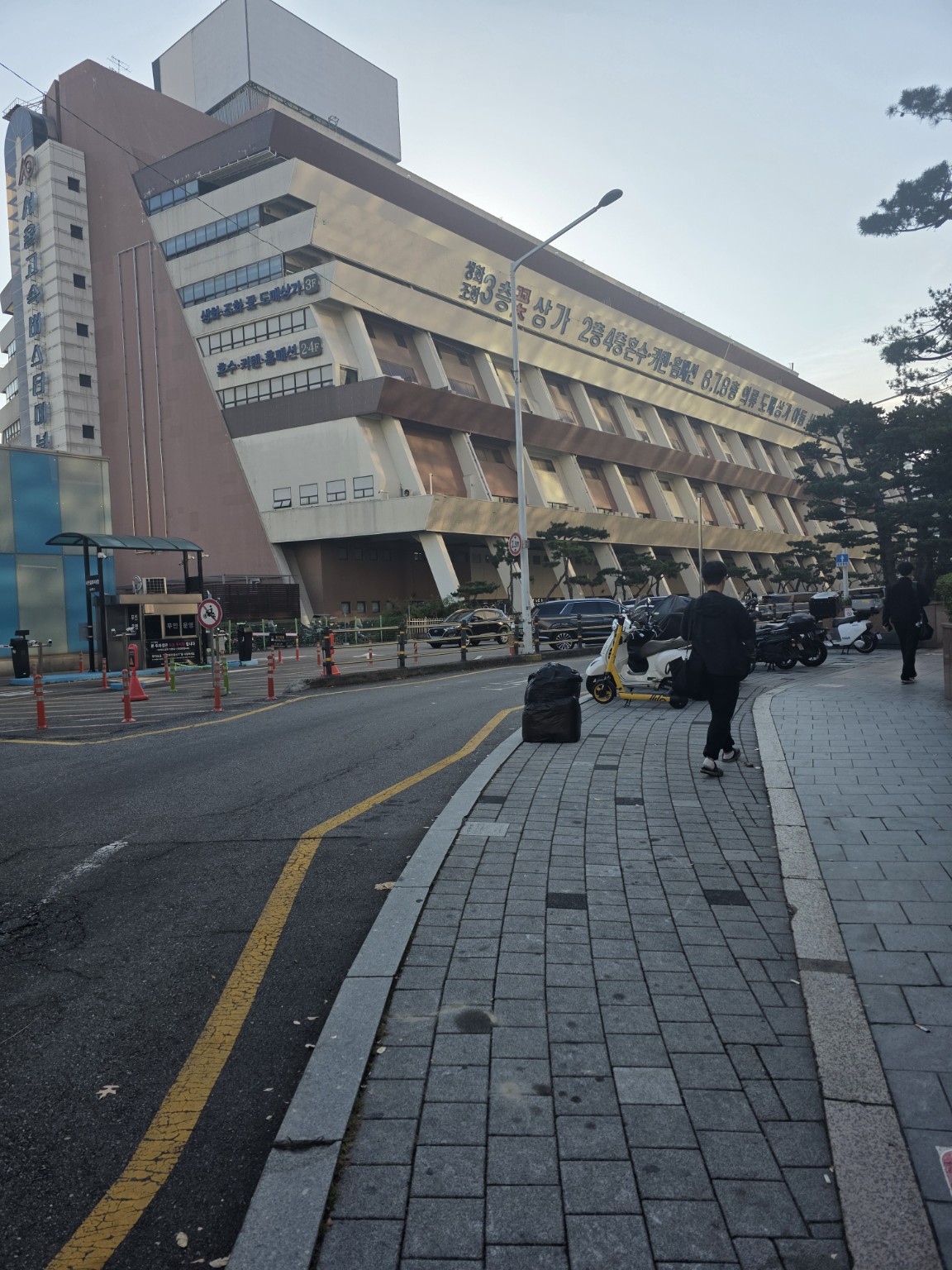
The building above is Seoul Express Bus Terminal; for the Central City example in this guide, continue to the neighbouring terminal.

Inside the complex, follow bus-terminal signs rather than shopping signs. Save both the English and Korean terminal names on your phone: Central City / 센트럴시티 is a proper name. Keep the destination terminal’s full name too; a city’s express and intercity bus terminals may be different places.
For the journey there, see our Seoul subway guide. If taking a taxi, show the driver the exact departure terminal from your booking; our Korea taxi guide covers pickup and payment.
2. Buy a ticket or collect an existing booking
These are separate tasks. If you have already paid, check your confirmation before making another purchase.
- No ticket yet: buy one at the terminal’s ticket counter or a suitable kiosk.
- Already booked: check whether you have a mobile boarding ticket or must collect a paper ticket.
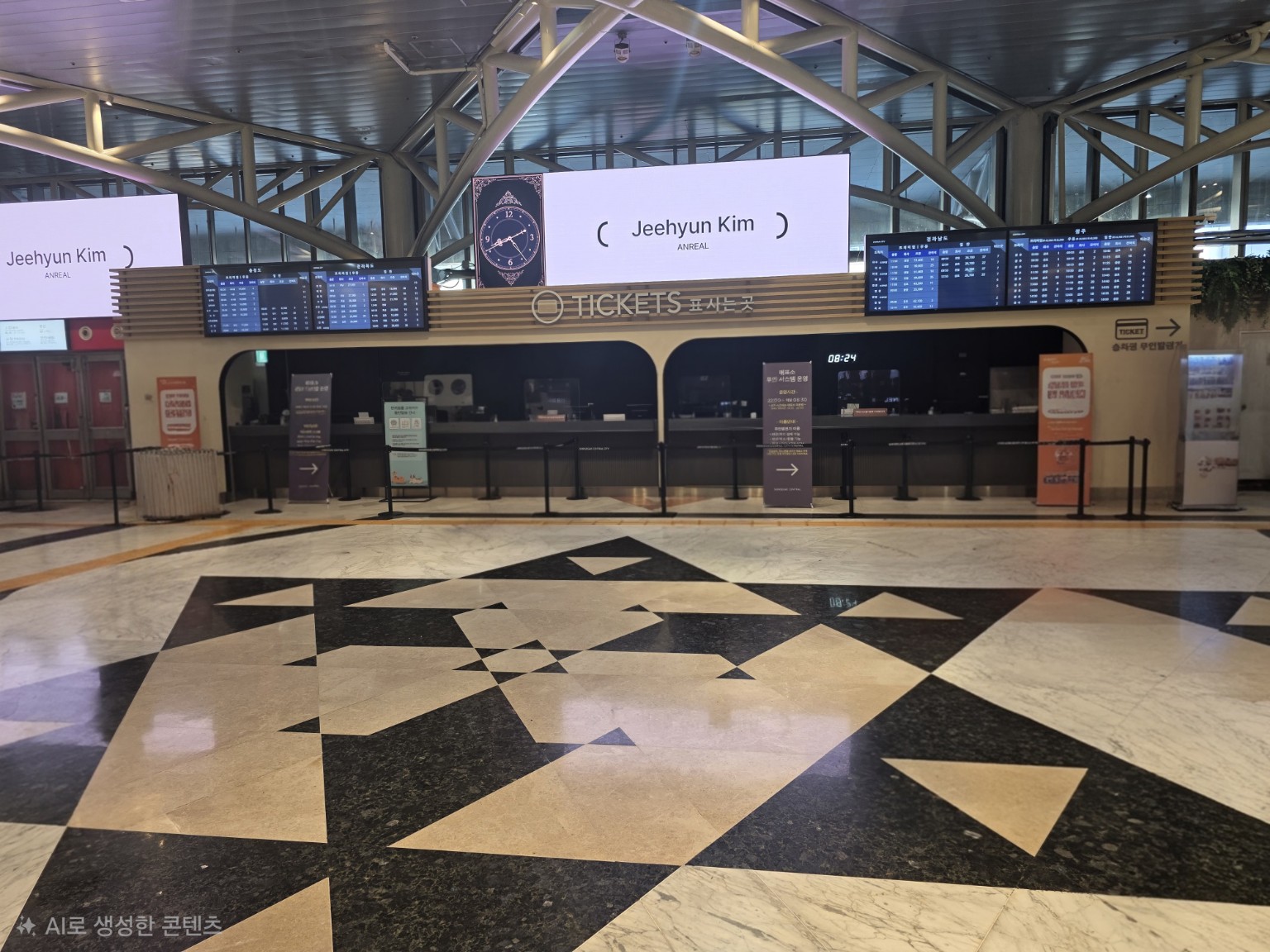
Check counter hours if you are leaving early
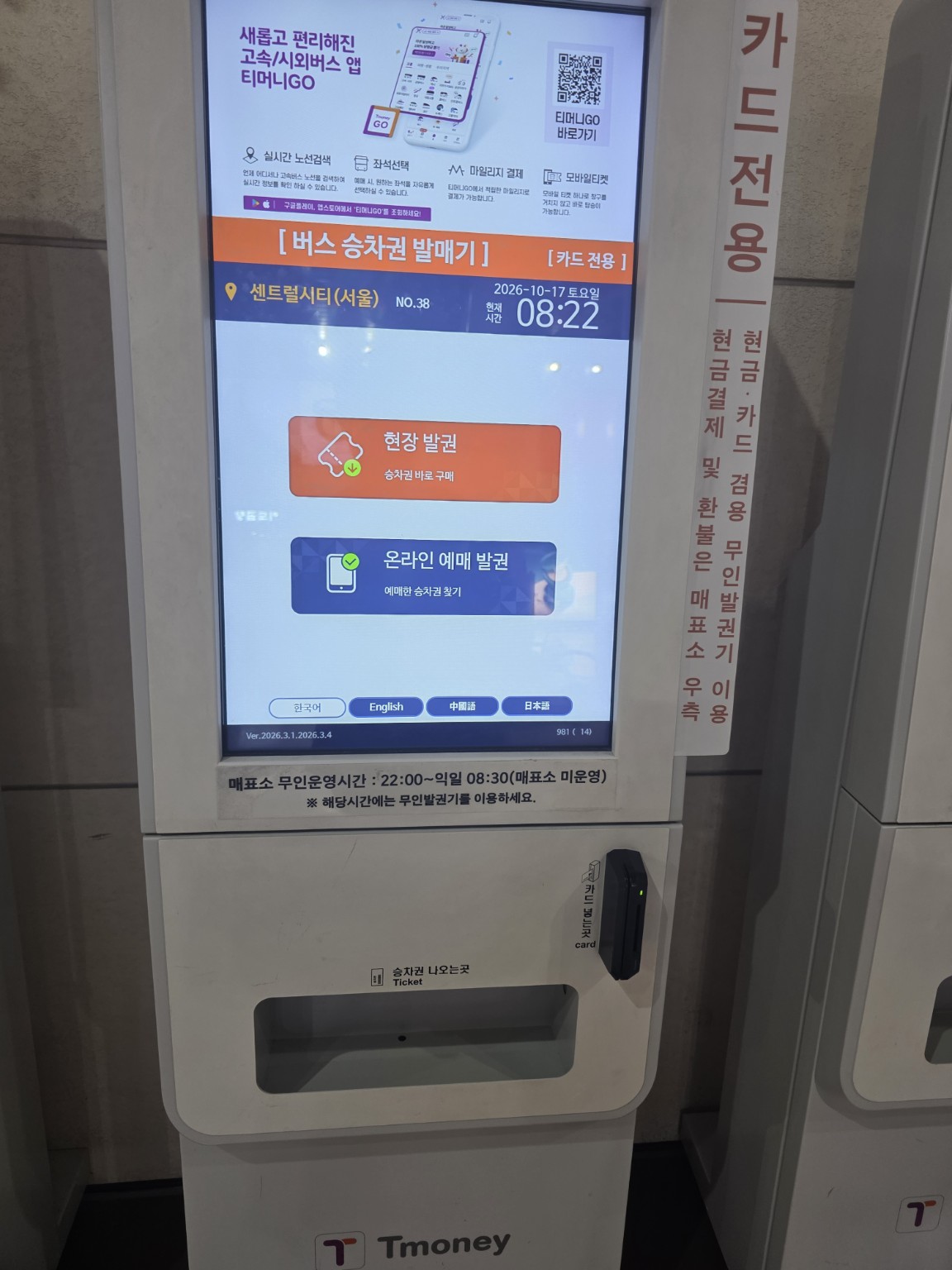
The photographed counter has a sign stating that it is unattended from 22:00 until 08:30 the following morning, directing passengers to ticket machines during that period. Check the current counter hours if you need staff assistance.For an early departure, arrange your ticket in advance or be ready to use a kiosk.3. Use the English ticket machine screen


- Purchase ticket / On-site ticketing: use this when you need to buy a ticket.
- Print E-tickets / Print reserved tickets: use this when collecting an existing booking that requires printing.
4. Read your ticket: gate number and seat number are different
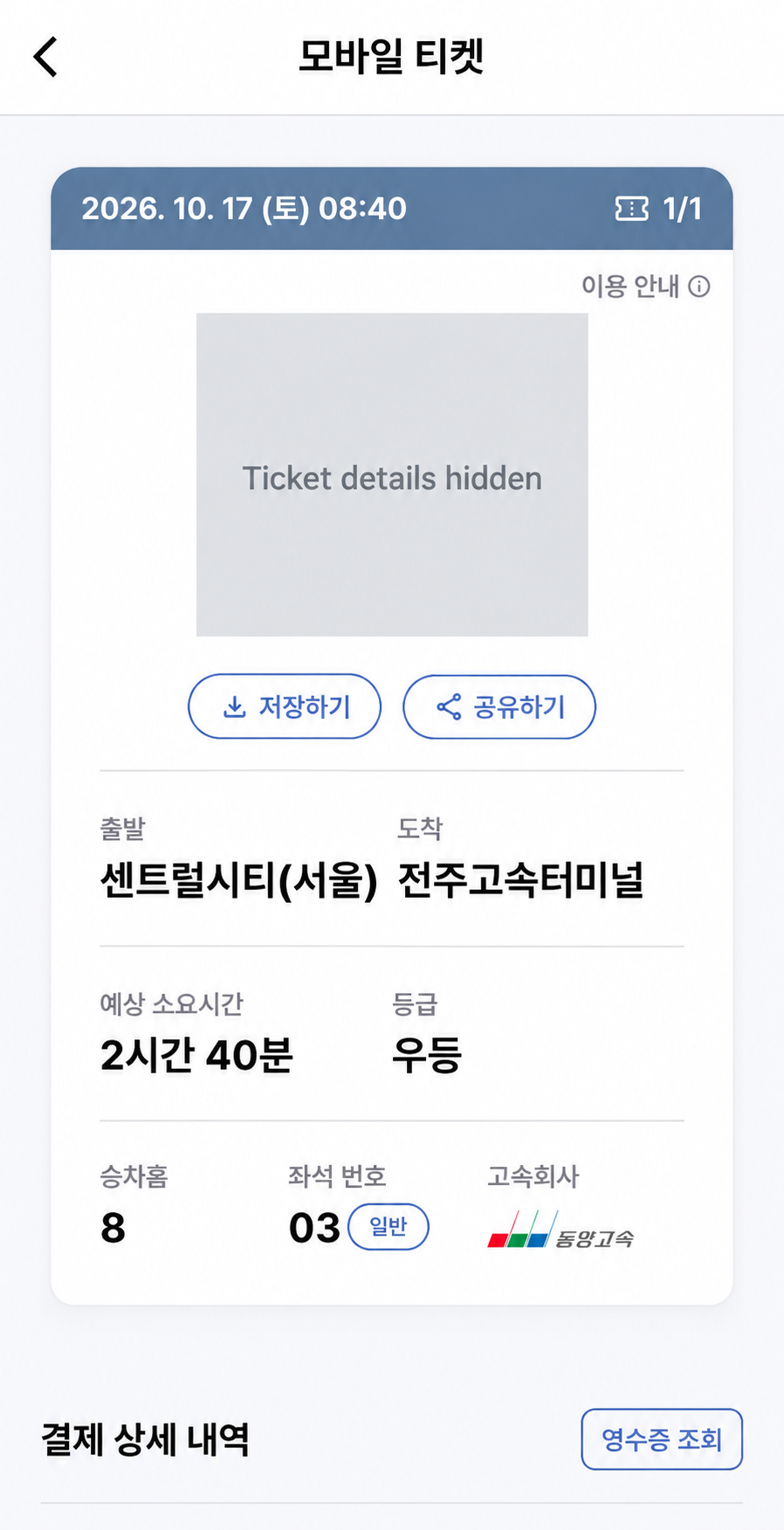
| Ticket label | Meaning | This example |
|---|---|---|
| 출발 | Departure terminal | Central City (Seoul) |
| 도착 | Arrival terminal | Jeonju Express Bus Terminal |
| Date / time at top | Scheduled departure | October 17, 08:40 |
| 예상 소요시간 | Estimated journey time | 2 hours 40 minutes |
| 등급 | Bus class | 우등 (udeung) |
| 승차홈 | Boarding gate / platform | 8 |
| 좌석 번호 | Seat number | 03 |
| 고속회사 | Bus operator | 동양고속 (Dongyang Express) |
5. Match the ticket to the boarding gate display
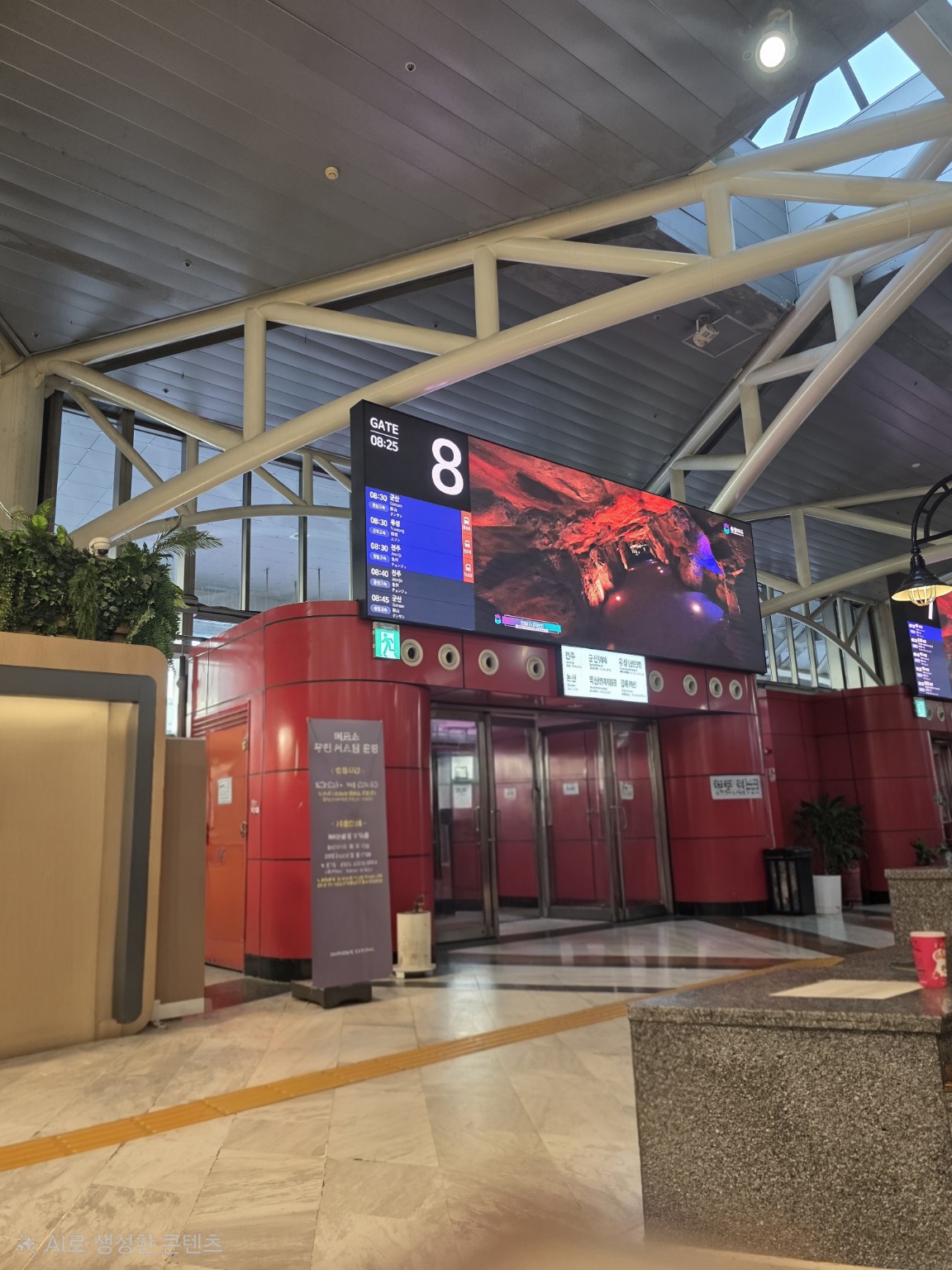
Mobile ticket or paper ticket?
A booking receipt and a boarding ticket are not always the same thing. Where mobile boarding is supported, open the actual mobile ticket and follow the driver’s or reader’s instructions. If the booking says to collect a paper ticket, do so before heading to the bus.T-money’s official Express Bus T-money app listing describes mobile ticket boarding with E-Pass. Check your own booking instructions to see whether you can board with your phone or need to collect a paper ticket.6. Board, store your luggage and find your seat
If you have a suitcase, ask the driver which luggage compartment to use before loading it. Keep your passport, valuables and anything you need during the journey with you. Check the operator’s rules for unusually large items.
After your ticket is checked, find your seat inside the bus. The example ticket shows seat 03; this is different from gate 8 outside. Keep your ticket until the journey is complete.
On arrival, collect your luggage and check that it is yours before leaving the terminal. Use the arrival terminal’s full name as the starting point for your onward route.
7. Use the restroom before departure and check rest-stop instructions
Korean long-distance buses generally do not have an onboard toilet. Use the terminal restroom before boarding. If a rest stop is important for your journey, ask about the service’s arrangements rather than assuming it will stop at a particular time.
If the driver announces a highway rest stop, confirm when to return before getting off. Note your bus’s registration number and parking position: several similar buses may be nearby. Allow time to get back before departure.
Useful Korean questions to show staff
- 전주 가는 버스표 한 장 주세요. — One ticket to Jeonju, please. Replace 전주 with your destination.
- 이 모바일 티켓을 종이 승차권으로 발권해야 하나요? — Do I need to have this mobile ticket issued as a paper boarding ticket?
- 몇 번 승차홈인가요? — Which boarding gate is it?
- 이 버스 맞나요? — Is this the right bus? Show your ticket as you ask.
- 휴게소에서 몇 시까지 돌아와야 하나요? — What time do I need to be back at the bus at the rest stop?
For signs and places to look during your trip, see our guide to finding a public restroom in Korea.
Before boarding: a quick checklist
- You are at the departure terminal named on your ticket.
- The travel date, departure time and destination terminal are correct.
- You have the required boarding ticket, rather than only a payment receipt.
- The gate display matches your destination and departure time; ask the driver if unsure.
- You know your assigned seat and have your valuables with you.
For a first journey, focus on the right terminal, departure and seat. Matching your ticket to the signs around you makes a large terminal easier to navigate.
Sources: Korea Tourism Organization: express and intercity buses; KOBUS route and ticket search; and the official T-money app listing linked above. The original Central City photos show the terminal signs and kiosk layout. Confirm current timetables, fares, payment requirements and boarding instructions when booking.